Smarter PHP in Visual Studio Code

Is this your brand on Milled? Claim it.

|
||||
|
Hello -, PHP extension for Visual Studio Code is receiving exciting new features, improvements, and fixes! Welcome to our newsletter, and thank you for using our extension. 
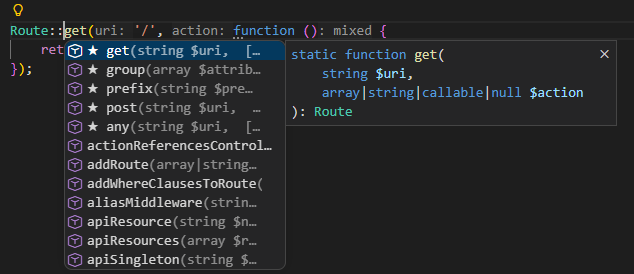
Recent releases introduce smarter code completion, deeper understanding of modern PHP patterns, improved debugging, better framework support, and a more complete PHP ecosystem experience. Whether you are working with Laravel, WordPress, or a custom PHP application, the update improves the way PHP Tools understands your code and helps you write better software with less friction. Smarter Code Completion with Starred SuggestionsFinding the right completion item is now faster with Starred Suggestions. The most probable member completions are automatically marked with a ★ and displayed at the top of the completion list.
The goal is simple: help you reach the symbol you need with fewer keystrokes. Nothing changes in your workflow — you can continue typing as usual, and the feature stays quietly in the background. You can also control this behavior using: This update also includes improvements to the underlying IntelliSense engine, including:
Read more at docs.devsense.com. Advanced Callback IntelligencePHP supports many dynamic calling patterns, including string callbacks and array-style callbacks. PHP Tools now understands these patterns much better. Functions referenced through:
are now validated, navigated, and analyzed with full IntelliSense support.
You now get:
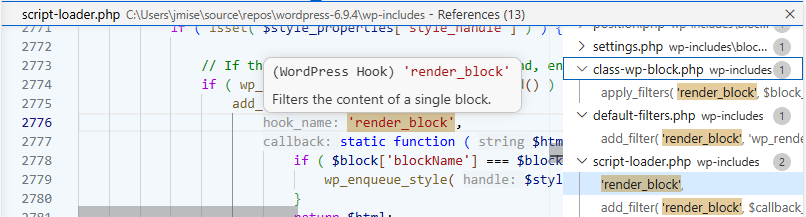
The result is a much more reliable experience when working with frameworks and applications that rely heavily on dynamic invocation. Improved WordPress Development ExperienceWordPress development gets several important improvements. PHP Tools now provides better support for WordPress hooks, including:
For example, WordPress hook names are now recognized as meaningful symbols rather than simple strings. This makes navigating large WordPress projects much easier. More about WordPress support at docs.devsense.com. Hooks Intelligence
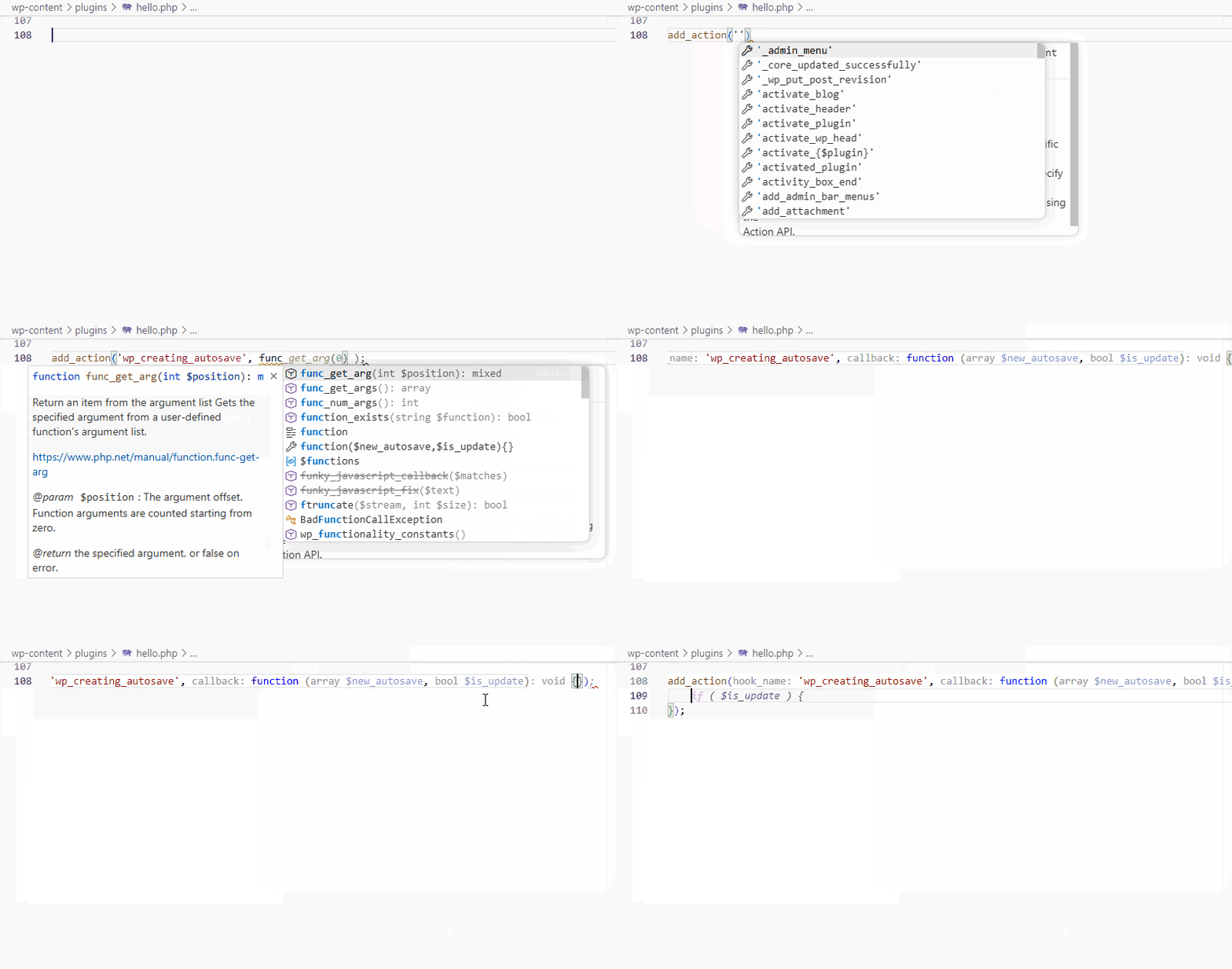
The completion of hooks gets even better. When implementing a hook (an action or a filter), the editor suggests an anonymous function with pre-filled arguments. And if there is an anonymous function, the inlay hints show types of the function’s parameters - in this case Updated PHP Manual IntegrationThe integrated PHP Manual support has received a major update. The complete multi-language PHP manual now includes:
These improvements enhance:
The update also introduces better localization support, including a Japanese UI translation and Chinese language support when VS Code is configured to use Chinese display language. How to work with available stubs can be found at docs.devsense.com. Laravel ImprovementsLaravel developers will benefit from improved framework awareness. This release improves:
Examples include better navigation from grouped Laravel route definitions and additional Livewire methods such as:
PHP Tools continues to improve its understanding of modern PHP frameworks and their conventions. More about Laravel support at docs.devsense.com. More Accurate Code Analysis and PHP IntelligenceThe update includes many improvements to PHP’s static analysis engine. New and improved checks include:
Attribute completion is also now context-aware; Only valid PHP attribute classes are suggested — specifically classes marked with This reduces unnecessary suggestions and prevents incorrect usage. More Powerful Code ActionsNew code actions help reduce repetitive editing. You can now:
Additional improvements include better handling of:
Smaller Improvements and Important FixesAlongside the major features, this release contains many smaller improvements that make everyday development smoother. Highlights include:
The update also includes numerous stability improvements and bug fixes, resulting in a faster and more reliable PHP development experience in Visual Studio Code. Upgrade PHP Tools for VS Code and enjoy smarter IntelliSense, improved debugging, stronger framework support, and a smoother PHP workflow. See the complete changelog for more details.
|
||||
|
Don't want to receive these e-mails? Unsubscribe View in browser |