|
DocuSign Developer Newsletter
ISSUE DATE: September 4, 2018
|
|
|
Welcome to the September 2018 edition of the DocuSign Developer Newsletter!
Our developer team is putting its feet on the street, sponsoring three hackathons and three conferences over the next two months. Check out the Upcoming Events section for more information and, if you aren't able to make it to an event in person, consider the three-day virtual .NET Conf and stay tuned to this newsletter for a recap of all the excitement and insights shared.
Last month, we debuted our new From the Trenches section, where we let you know about important issues our developer support or professional services teams encounter when working with customers. We covered the issues that can prevent JWT authentication from working correctly—and how to address them. (Missed last month's edition? Visit the archive.) This month, we're outlining the top issues that can prevent you from passing the automated go live review, a critical step in moving from demo to production. You'll find solid tips that even experienced DocuSign developers can overlook from time to time.
Have a topic you'd like to see covered in this newsletter? Take our short survey and share your thoughts!

|
Thanks for reading,

Director, Developer Content
|
Was this newsletter forwarded to you by someone else? Subscribe today.
|
|
|
|

IN THE NEWS
|
|
New C# Code Examples Now Available
 We've been hard at work in creating a bunch of code examples that you can actually run. We just released JSON Web Token (JWT) code examples in both C# .NET Core and C# .NET Framework. We're expanding the code examples we offer to cover common scenarios using our latest OAuth technologies and much more. Learn more
about the newest code examples, and our launcher framework, which enables you to run the code and see how it works in real time. We've been hard at work in creating a bunch of code examples that you can actually run. We just released JSON Web Token (JWT) code examples in both C# .NET Core and C# .NET Framework. We're expanding the code examples we offer to cover common scenarios using our latest OAuth technologies and much more. Learn more
about the newest code examples, and our launcher framework, which enables you to run the code and see how it works in real time.
|
|
The New DocuSign Trust Center: Trust Starts Here
 Take a look at the evolution of the DocuSign Trust Center, your one-stop shop for legal, privacy, compliance, security, and system performance information related to DocuSign’s System of Agreement. Learn about the latest improvements then bookmark the Trust Center for answers to common questions about how DocuSign protects data, information about DocuSign industry certifications, quick access to the DocuSign eSignature service system status, and more. Take a look at the evolution of the DocuSign Trust Center, your one-stop shop for legal, privacy, compliance, security, and system performance information related to DocuSign’s System of Agreement. Learn about the latest improvements then bookmark the Trust Center for answers to common questions about how DocuSign protects data, information about DocuSign industry certifications, quick access to the DocuSign eSignature service system status, and more.
|
|
DocuSign signs definitive agreement to acquire SpringCM
 DocuSign recently announced that it will be acquiring Spring CM, a cloud-based contract lifecycle management software company specializing in document generation, redlining, advanced document management, and end-to-end agreement workflow. Read the official announcement to learn how the deal will accelerate DocuSign's ability to go beyond e-signatures and expand our System of Agreement vision. DocuSign recently announced that it will be acquiring Spring CM, a cloud-based contract lifecycle management software company specializing in document generation, redlining, advanced document management, and end-to-end agreement workflow. Read the official announcement to learn how the deal will accelerate DocuSign's ability to go beyond e-signatures and expand our System of Agreement vision.
|
|
|
|

DEVELOPER CENTER AND BEST PRACTICES
|
|
Status and Events Guides
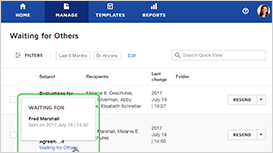 Want to integrate real-time envelope status and events into your application UI? Need to alert users as recipients view and sign envelopes? Check out the DocuSign eSignature REST API Status and Events Guides. We walk you through the ins and outs of eventNotification and Connect webhooks or, if you prefer to use polling, provide some best practices to avoid potential integration failure. Want to integrate real-time envelope status and events into your application UI? Need to alert users as recipients view and sign envelopes? Check out the DocuSign eSignature REST API Status and Events Guides. We walk you through the ins and outs of eventNotification and Connect webhooks or, if you prefer to use polling, provide some best practices to avoid potential integration failure.
|
|
|
|

API SUCCESS STORIES
|
|
 Covered California, is the state-based marketplace where Californians can sign up for health insurance under the Affordable Care Act (ACA). They have created a custom solution leveraging the eSignature API and DocuSign for Salesforce
that integrates with Salesforce Communities and automates the review and approval of agreements from the entities that provide Californians with access to ACA-qualified health plans. Using the guidance found on the DocuSign Developer Center along with some best practices from the DocuSign Professional Services team, it took only three weeks for Covered California's team to create the prototype, complete development, and roll out their custom solution. Read more about their journey in this API success story. Covered California, is the state-based marketplace where Californians can sign up for health insurance under the Affordable Care Act (ACA). They have created a custom solution leveraging the eSignature API and DocuSign for Salesforce
that integrates with Salesforce Communities and automates the review and approval of agreements from the entities that provide Californians with access to ACA-qualified health plans. Using the guidance found on the DocuSign Developer Center along with some best practices from the DocuSign Professional Services team, it took only three weeks for Covered California's team to create the prototype, complete development, and roll out their custom solution. Read more about their journey in this API success story.
|
|
|
|

DEVELOPER SPOTLIGHT
|
|
|
Robert Perona
 Robert Perona is a Staff Engineer with the Document Platform team at Ellie Mae, a software company that processes 35% of mortgage applications in the United States. A self-trained software developer who started his professional career automating business processes at retail companies, Robert joined Ellie Mae almost three years ago as a Software Engineer. Today he works primarily on the secure document delivery system behind Ellie Mae’s Encompass Lending Platform,
which uses the DocuSign eSignature REST API to provide signing functionality in conjunction with Connect Webhooks to provide near real-time updates to Ellie Mae customers, trigger notifications, and load data based on recipient signing. According to Robert, "The comprehensive APIs have been great in allowing us to optimize the creation process using multi-part requests and streaming posts for envelope creation." Robert Perona is a Staff Engineer with the Document Platform team at Ellie Mae, a software company that processes 35% of mortgage applications in the United States. A self-trained software developer who started his professional career automating business processes at retail companies, Robert joined Ellie Mae almost three years ago as a Software Engineer. Today he works primarily on the secure document delivery system behind Ellie Mae’s Encompass Lending Platform,
which uses the DocuSign eSignature REST API to provide signing functionality in conjunction with Connect Webhooks to provide near real-time updates to Ellie Mae customers, trigger notifications, and load data based on recipient signing. According to Robert, "The comprehensive APIs have been great in allowing us to optimize the creation process using multi-part requests and streaming posts for envelope creation."
Also of great importance to Ellie Mae’s integration is DocuSign’s comprehensive audit information, which it leverages for compliance tracking and integrations as evidence. Robert has worked closely with the DocuSign API team and has seen his feedback integrated in each iteration of the documentation, which has quickly evolved into a robust source of information where he rarely has to ask additional questions.
In his free, time, Robert enjoys ice skating, playing games with his family or on the Nintendo Switch, playing volleyball with his teammates, learning new things about physics and science (currently quantum computing), and (of course) coding. You can find him on LinkedIn.
If you have deployed solutions using the DocuSign eSignature API and you'd like to be considered for a future Developer Spotlight, please send an email to [email protected] with information about your solution and a bio.
|
|
|
|

RELEASE NOTES ROUNDUP
|
|
We routinely update the platform to add new functionality and to address issues. This article outlines some of the recent high-level changes made to the platform. Detailed release notes for all releases can be found here. Release notes specific to API updates can be found here.
September 2018 Release Notes
-
Release type — Monthly release
-
Release date — August 26, 2018
-
Platform(s) affected — Demo (Sandbox)
-
Release notes detail — Click here
September 2018 Release Notes Summary
-
Signing Links Expire Automatically — To improve the security of unauthenticated access to envelopes, links to envelopes expire after five clicks or 48 hours from the time they are sent.
-
Change to Applied Template — In an in-process envelope, when users replace a document that has an applied template, they are presented with a dialog box to confirm that the applied template information will become part of the envelope. Otherwise, they can cancel and return to the in-process envelope with the original document and template intact.
-
Admins Can Delete Multiple Templates — Admins can now select and delete multiple templates that they own or that are shared with them.
-
Support for DocuSign Print Driver v2 is Ending — Starting January 2019, Print Driver v2 will no longer function. To upgrade to Print Driver v3.x, visit the DocuSign Support download site.
-
Bug fixes — Reminders and expiries were not being honored after the first recipient when set for multiple recipients. Merge fields mapped to a DocuSign for Salesforce account were not visible on the Add Fields page when preparing an envelope. Recipients were not receiving email notifications to sign when templates were viewed with Recipient Preview before sending. Using the SOAP API, occasionally the recipient was not properly redirected to the signing-complete URL specified in the envelope.
-
Coming soon — When a signer opens a PowerForm, they will see a new, responsive pre-signing page. You'll be able to set Document Visibility on PowerForms. Add Original Owner as Carbon Copy Recipient, is being added to the Transfer Ownership dialog box. Users will be able to include SBS information necessary in the Bulk Send CSV file, and set the recipient language for each entry.
August 2018 Release Notes
-
Release type — Monthly release
-
Release date — August 2, 2018
-
Platform(s) affected — Production
-
Release notes detail — Click here
August 2018 Release Notes Summary
-
Audit Sharing Envelope Events — Envelope Sharing events are now logged in the account audit logs.
-
Support for Automatic Activation of Sub-domains — For SSO customers, sub-domains can be automatically verified if the root domain has been verified by DNS, allowing you to add any sub-domain without having to perform full DNS verification.
-
Prevent Users from Using Personal DocuSign Accounts on Company Network — This feature can be enabled to enforce that a user can log in only to a DocuSign account that belongs to the organization.
-
Authorize a Service Application to Access Only an Individual User Account — If your app uses service authentication, you can now authorize a service app to access only an individual user’s account. You can pick an individual user and give them impersonation permission for a specific integrator key.
-
Bug fixes — When setting up a formula that included fields and a numeral entered manually, when the envelope was sent, the numeral was stripped of all but the first digit. Merge fields mapped to a DocuSign for Salesforce account were not visible on the Add Fields page when preparing an envelope. Using the SOAP API, occasionally the recipient was not properly redirected to the signing-complete URL specified in the envelope.
-
Coming soon — Access Code restrictions will be enforced when viewing another user's inbox through Envelope Sharing. After correcting a shared envelope, users will be returned to the shared inbox instead of their own inbox. Uploaded templates will only be shared with users when the appropriate shared status is present.
|
|
|
|

FROM THE TRENCHES
|
|
|
Top Issues That Block Developers From Passing The Automated Go Live Review
Passing the go live review is a critical step in moving an integration from demo to production. While the rules for the review are fairly straightforward, passing the review isn't always so simple. An integrator key must be associated with more than 20 consecutive successful API calls and cannot have commited polling violations during the 24-hour timespan the review tool is checking. For more information on the go live process, see the Go Live API Overview on the Developer Center.
Here are a few common causes of failure, and what you can do to prevent them from blocking a review request:
-
Insufficient traffic – The go live review is looking for more than 20 API calls, or transactions, from an integrator key. There are a few reasons why this might cause an unexpected failure:
- Login and Account Server GetUserInfo calls are excluded from the count.
- Actions taken in the New DocuSign Experience or with other integrator keys are not counted.
- While the review tool normally picks up data in near-real time, in some cases it can be 5-10 minutes before API calls made are available to the review tool. If you submitted a key for review immediately after making the necessary API calls, it may be necessary to resubmit so that the traffic has had time to process.
-
Volume of errors – The go live review requires 20 consecutive successful API calls.
- If the traffic reviewed included any calls that returned a 400 or 500 error code, you will need to ensure that you had enough successful calls in a row to have a block of valid traffic.
- For this check, ensuring that your integration has proper error reporting is very helpful.
-
Polling violations - Requesting the same unique envelope resource multiple times within a 15-minute period is a violation of the DocuSign API rules. While these calls will always function and return the most recent data, they will cause a key to fail a go live review.
- Any polling violations within the 24-hour span will continue to cause a key to fail review. You will either need to wait until a new day to run “clean” traffic without polling violations, or generate a new integrator key and perform 20 new transactions using that key.
- Calls to the same endpoint on different envelopes are acceptable. For example, you can get tab data of several different envelopes within a short window without issue.
- Calls to the same endpoint on the same envelope are unacceptable even if the data is expected to change. If you get a recipient's tag information, add an additional tag, and then get the same recipient's tags again within a few minutes, this is considered a violation of the polling rule.
-
Unfamiliar integration - If you are working with an integration developed by a third-party and they are requiring you to complete a go live review to provide your own integrator key, you will need to work with that party’s support team. They should be able to provide you with a valid workflow and steps to take to pass review.
We're currently working on improvements to the go live process to expose exactly why a key fails review. In the meantime, the same generic message appears for all failures. For go live assistance, email [email protected].
 Thanks to Drew Martin on our developer support team for providing this month's best practices! More information about developer support options for the DocuSign eSignature REST API can be found on this support page. Thanks to Drew Martin on our developer support team for providing this month's best practices! More information about developer support options for the DocuSign eSignature REST API can be found on this support page.
|
|
|
|

TOP TRENDING TOPICS
|
|
|
The top trending topics on Stack Overflow for the docusignapi tag are determined based on views and/or comments on specific threads. Here are the top three most frequently asked or viewed questions and answers:
Thread: Docusign - How do I send a document to multiple signers and have them sign on the document through API
Summary: The poster wanted to send a document out to multiple approvers, but was having difficulty adding multiple signers to the request body.
Answer: The poster was advised to look at the Sample Request with Multiple Recipients on the DocuSign Developer Center for guidance on how to set the routingOrder for the templateRole.
Thread: Issue when trying to login with Docusign API by official python lib on live account
Summary: The poster was getting only an empty object when logging in via the API using a live account.
Answer: The poster was using the the AuthenticationApi.login() method, which is intended for Legacy Header authentication, not JWT/OAuth. The poster was informed to user the GetUserInfo method, which hasn't yet been implemented in the Python client, and that he would need to make the call manually and provided an example that used the Requests package.
Thread: DocuSign how to save the Private key as a .PEM file
Summary: The poster was following the guidance outlined in the JSON Web Token Bearer Grant guide, which recommends that you save the Private Key as a .PEM file and wanted to know how to save the key in this format.
Answer: The poster was advised to simply rename docusignPrivateKey.txt to docusignPrivateKey.pem.
|
|
|
If you’d like to contribute to the community or ask a question, please visit us on Stack Overflow. Don’t forget to visit our Developer Center for complete documentation on how to use the DocuSign eSignature API.
|
|
|
|

UPCOMING EVENTS
|
|
|
PennApps XVIII - September 7-9
The nation's first student-run college hackathon, PennApps is open to student developers of all levels to hack on specific themes as well as hardware. As a Giga-level sponsor, DocuSign will be sending a half dozen mentors, running an “Introduction to the DocuSign eSignature API” workshop, and sponsoring a challenge where hackers will be encouraged to innovate using the DocuSign eSignature API. Prizes will be great, and may include cash as well as exciting, long-term opportunities at DocuSign.
|
|
|
.NET Conf - September 12-14
DocuSign will be sponsoring .NET Conf 2018, a free, three-day virtual developer event co-organized by the .NET community and Microsoft. Join us and the rest of the .NET community for live sessions and a DocuSign-sponsored viewing party—and, while you're gearing up for the event, check out the updated DocuSign C# SDK and C# code samples.
|
|
|
HackMIT 2018 - September 15-16
DocuSign is a Gold-level sponsor at HackMIT in Boston this year. We'll be sending mentors, running a brand new workshop, and sponsoring a DocuSign eSignature API challenge for exciting prizes. The event is team-based, but don't worry if you don't have a team yet. There will be team formation and ideation events geared toward helping you find people to work with.
|
|
|
Dreamforce 18 - September 25-28
Join DocuSign at Dreamforce 18 in San Francisco for in-depth sessions on integrating DocuSign into your Saleforce ecosystem and opportunities to connect with our development experts to hear valuable tips and tricks that will help make your DocuSign-Saleforce integrations successful. Register today and stay tuned for more details.
|
|
|
SD Hacks - October 12-14
SD Hacks, UC San Diego's annual collegiate hackathon is back with another round of workshops, challenges, and networking opportunities. DocuSign will be a Gold-level sponsor at this year's event and our team of mentors will be onsite to conduct an "Introduction to the DocuSign eSignature API" workshop, offer guidance, and support some fun challenges for prizes. Stay tuned for more details about the event and open registration.
|
|
|
Twilio SIGNAL - October 17-18
DocuSign will be a Creator-level sponsor at SIGNAL, Twilio's annual customer and developer conference, which takes place in San Francisco. In addition to our expo booth, we'll be conducting demos to help you get started with your DocuSign integrations, or take them to the next level. Register today for early bird rates.
|
|
|
|
|
| SHARE YOUR FEEDBACK |
|
| We want to make sure that this newsletter is as useful as possible. Here is a link to a very short survey – please take a minute to give us feedback. |
|
|
|
|
|
|