US · git-tower.com

Tower 12 for Windows – Custom Git Workflows! 🎉

Custom Git Workflows arrive on Windows, plus a new free tool, an intro to Jujutsu, and more!


This email was sent

Is this your brand on Milled? Claim it.

Custom Git Workflows arrive on Windows, plus a new free tool, an intro to Jujutsu, and more!
 ‌ ‌ ‌ ‌ ‌ ‌ ‌ ‌ ‌ ‌ ‌ ‌ ‌ ‌ ‌ ‌ ‌ ‌ ‌ ‌ ‌ ‌ ‌ ‌ ‌ ‌ ‌ ‌ ‌ ‌ ‌ ‌ ‌ ‌ ‌ ‌ ‌ ‌ ‌ ‌ ‌ ‌ ‌ ‌ ‌ ‌ ‌ ‌ ‌ ‌ ‌ ‌ ‌ ‌ ‌ ‌ ‌ ‌ ‌ ‌ ‌ ‌ ‌ ‌ ‌ ‌ ‌ ‌ ‌ ‌ ‌ ‌ ‌ ‌ ‌ ‌ ‌ ‌ ‌ ‌ ‌ ‌ ‌ ‌ ‌ ‌ ‌ ‌ ‌ ‌ ‌ ‌ ‌ ‌ ‌ ‌ ‌ ‌ ‌ ‌ ‌ ‌ ‌ ‌ ‌ ‌ ‌ ‌ ‌ ‌ ‌ ‌ ‌ ‌ ‌ ‌ ‌ ‌ ‌ ‌ ‌ ‌ ‌ ‌ ‌ ‌
Tower logo

What's New at Tower?

Custom Git Workflows 🤝 Windows
We've also got some great learning resources and a brand-new free tool for you!

Tower 12 for Windows — Custom Git Workflows

After introducing Custom Git Workflows in Tower 14 for Mac, we're thrilled to bring this powerful feature to Tower 12 for Windows!


You can now design the exact branching and merging strategy that fits your team's needs — whether that's a well-known model like git-flow, GitHub Flow, GitLab Flow, or something entirely your own 😎


For each workflow, you can define:

  • Trunk and Base Branches (e.g. main, develop)

  • Topic Branch Types with naming prefixes (feature/, hotfix/, and any custom type you need)

  • Merge Strategies — separate settings for upstream and downstream, including merge, rebase, or squash

Starting and finishing branches is just a click away, and Tower will notify you whenever it's time to update your branch.

See What's New

NEW Free Tool: Git Hooks Library

We've just launched a free Git Hooks Library — a curated collection of production-ready hook scripts that you can configure and copy directly into your repository.


The library covers five key areas

  • Code Quality

  • Commit Message Standards

  • Security & Secrets

  • Branch & Workflow Protection

  • Testing

Whether you need to enforce Conventional Commits, scan for secrets and API keys, block commits to protected branches, or run tests before pushing — there's a hook ready for you.

Browse the Library

How We Shipped git-flow-next 1.0 (Almost Entirely) with AI

We've been promising to share the story behind git-flow-next, and now we're delivering. Our open-source CLI tool was developed almost entirely with AI—not as a gimmick, but through a process that involved some challenges.


This post is the honest account: what worked, what failed, and how the approach evolved from vibe coding with Cursor to a structured system where a single command takes a GitHub issue and returns a ready-to-review pull request.


The biggest takeaway? AI development isn't "telling AI what to build." The guidelines, skills, and architectural docs are the actual product — and this post walks through exactly how we built them.

Read the Full Story

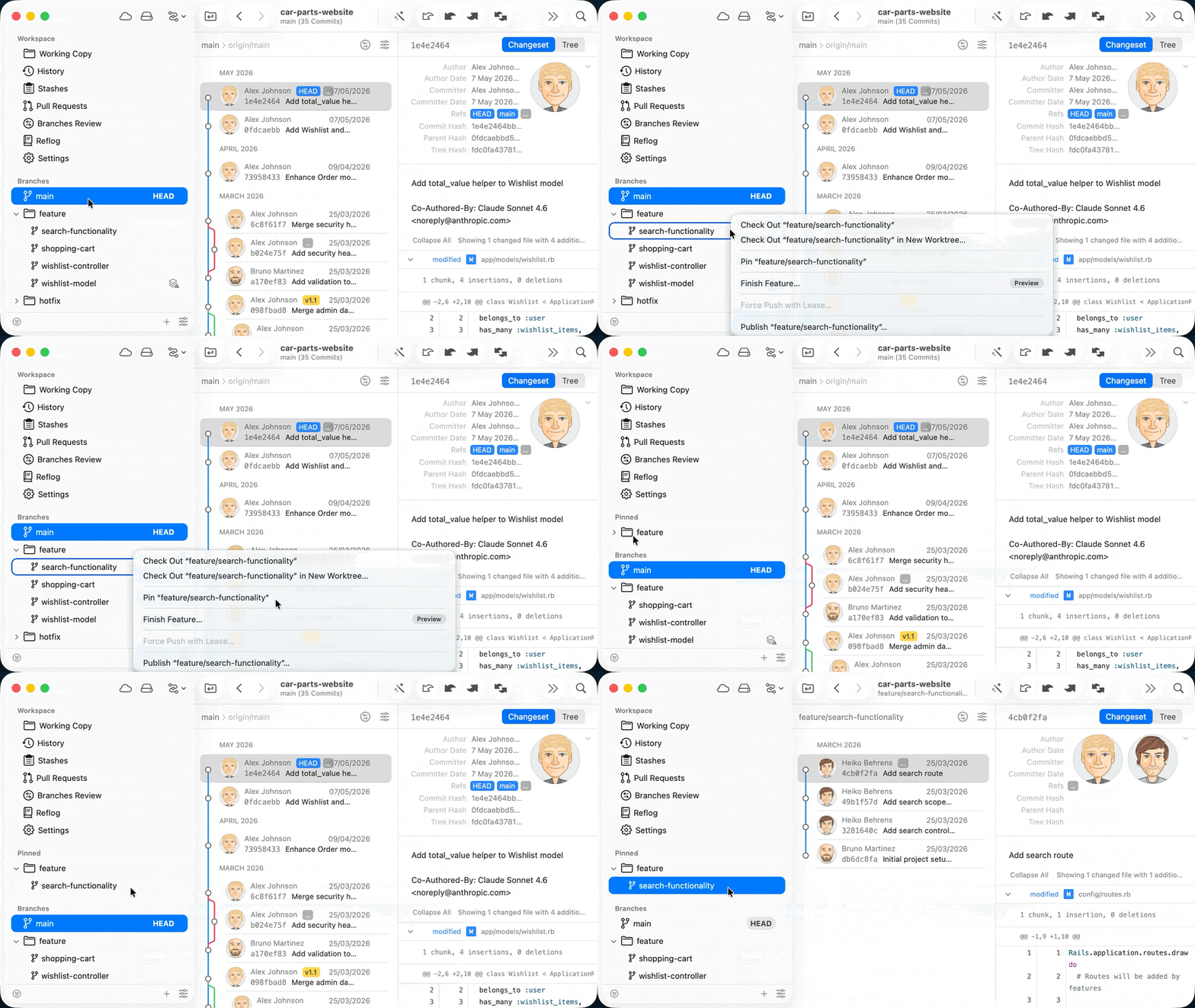
💡 Tower Tip – Branch Pinning

In Tower for Mac, you can pin your favorite branches for improved accessibility.


Simply right-click any branch and select the "Pin [BRANCH]" option.

Jujutsu: The Git Upgrade You Didn't Know You Needed

Have you heard of Jujutsu (jj)? It's a version control system that keeps everything great about Git — the distributed model, the commit graph, full GitHub/GitLab compatibility — and rethinks the parts that have always been awkward.


No staging area. No stashing. No rebasing anxiety. Your working copy is always a commit, change IDs survive rewrites, and conflicts don't stop the world — they're just a state you can resolve when you're ready.


The best part? You can try it in any existing Git repo with a single command — no commitment required. And with AI agents now writing code alongside us, jj's cleaner foundations are starting to matter more than ever.

Read the Article

Win our "Git Coffee" Mug!

Support Tower for a chance to win our popular Git Coffee mug! Simply share our latest Tower for Windows release to enter the giveaway! 🎁


To participate, click the link below, send out the resulting tweet (or copy and paste), and follow us. That's it!


We’ll notify the winners on June 18, 2026. Good luck!

Tower 12 for Windows lets you design your own Custom Git Workflows — define branches, merge strategies, and rules that fit how your team actually works! https://www.git-tower.com/blog/tower-windows-12

Thank you for your support!

The Tower Team


Are you sure?

Lists help you organize the brands that you care about. Your lists are private to you.