MobilePro #226: When iOS Understands the Conversation
Latest Mobile Dev Insights: iOS, Android, Cross-Platform

Is this your brand on Milled? Claim it.

MobilePro #226: When iOS Understands the ConversationLatest Mobile Dev Insights: iOS, Android, Cross-Platform
The best AI feature might be the one your users never notice. The AI conversation often revolves around bigger models, better prompts, and smarter assistants. But increasingly, the most useful experiences come from intelligence that’s quietly woven into the platform itself. Instead of asking users to interact with AI directly, the operating system simply understands enough context to make the next step easier. That’s exactly what this week’s article explores with iOS 27’s new Suggested Actions framework. By turning conversations into context-aware system actions, like creating calendar events or opening locations, Apple is showing a different direction for AI in mobile apps. It comes at an interesting time, with iOS 26.6 preparing developers for the transition to iOS 27, Claude Code bringing live iOS Simulator testing into the development workflow, and Android moving toward a more open AI ecosystem. The future of mobile development isn’t just about adding AI—it’s about knowing when the platform can do the heavy lifting for you. TL;DR
This week’s news corner
A glimpse of BuildWithAI newsletterBuilding with AI is quickly becoming part of every developer’s workflow. Each week, Build with AI explores practical AI engineering, agentic development, LLMs, MCP, coding tools, and the techniques shaping modern software development. Here’s a glimpse into a recent featured article: 10x value, not 10x volume: Where the real gains come fromAs individual developers adopt AI assistants, we frequently hear reports of incredible velocity gains. “Copilot made me 3x faster.” “I built a whole MVP in a weekend that would have normally taken a month.” The Factory era is not a forecast. Large engineering organizations already run in-house agent platforms against their production codebases at a scale no individual could match. That’s the organizational footprint of a practice that has moved well beyond one engineer typing faster. While individual velocity spikes are very real, they often create a localized illusion of productivity that fails to materialize at the organizational level. Individual speed is a false summit. You feel like you have reached the top because your own keyboard is faster, but cycle time and the team’s DORA numbers stay flat until the system around the agent changes. The climb that matters has barely started. Why does the gain vanish? Because of the Theory of Constraints. In any system, improving the throughput of a non-bottleneck step does not improve the throughput of the whole system; it just moves the bottleneck somewhere else. If you make code generation ten times faster, but your code review processes, security audits, QA testing cycles, and deployment pipelines remain manual, you haven’t delivered value to the user ten times faster. You have merely stockpiled a 10x backlog of unverified code waiting to pass through the human bottleneck downstream. This is why the obsession with 10x volume, with raw output or hyper-productive individual vibe coders, misses the broader goal. The real gains of the AI transformation do not come from individuals typing faster. They come from 10x value: delivered, verified work that reaches the user. And that value comes from designing the team and the system around the agent, not from speeding up the individual at the keyboard. Agentic engineering looks at the entire software development lifecycle (SDLC) holistically. It measures success not by how many lines of code a single individual produces in an hour, but by how dependably the organization ships verified solutions. To track this, agentic teams align closely with the DORA metrics. Originally designed to measure human operational excellence, these metrics become the ultimate lifeline when scaling autonomous agents. Building Smarter Messaging Apps with Suggested Actions, Not Custom Prompts
Anton Gubarenko is an Independent iOS Consultant, Mentor, and Startup Advisor with 16+ years of experience building mobile products. He has worked with companies around the world, from the United States to New Zealand, helping teams design scalable architectures and deliver high-quality iOS applications. Anton continuously follows the latest developments in the Apple ecosystem by exploring Swift and iOS conferences, and shares his knowledge with the global developer community through writing, mentoring, and speaking. Apple added a small framework in iOS 27 that can turn message content into useful actions without requiring a custom language-model prompt. SuggestedActionsView analyzes the message context you provide and displays relevant actions directly below a message. A conversation about watching a movie, for example, can produce an action for adding the agreed cinema time to Calendar. The analysis happens on-device, and the framework does not send the message content to Apple servers. This feature is still in beta and might change before the final release. What Suggested Actions can detectThe framework looks for actionable information inside a conversation. Apple currently highlights examples such as:
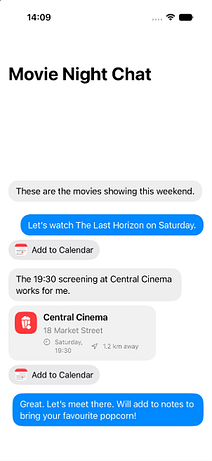
You do not define the buttons yourself. You provide the current message and some previous messages, and the system decides whether an action is appropriate. If no action is available, SuggestedActionsView has zero size and does not add an empty gap to the layout. This means it can safely be added below every message cell. MessageKit or SwiftUI?MessageKit does not provide native SwiftUI message cells. It is a UIKit-based library built around MessagesViewController, MessagesCollectionView, and MessageContentCell. For this example, a small custom SwiftUI chat works better. It also lets us place SuggestedActionsView directly below each message without wrapping it in UIKit. A production UIKit chat can still use the framework by hosting SuggestedActionsView inside a UIHostingController or UIHostingConfiguration. Chat modelThe visual message model contains an optional image, but SuggestedActionsMessage receives the textual message context only: The id matters because the framework uses it when caching generated actions. For a real one-to-one conversation, populate recipients with the other participant instead of leaving it empty. Demo conversationThe sample conversation has two friends choosing a movie and agreeing to meet at the cinema: The last two messages give the framework enough context to recognize a date, time, and cinema-related plan. SwiftUI message cellThe cell displays an optional image, a message bubble, and the system-provided actions underneath: There is no conditional around SuggestedActionsView. When the system has nothing useful to show, the view collapses to zero size. Complete chat screenEach cell receives only the messages that appeared before it. This prevents a future reply from influencing an earlier suggestion. The framework also limits how much previous context it accepts. Applying previousMessagesLimit keeps the input within the supported range.
This is how a generated actions are looking in Simulator. Location and Calendar are linked to the corresponding cells. Amazing! Pre-generating ActionsSuggestedActionsView can generate actions when it appears, but that may briefly show a loading state. You can generate and cache the result earlier: Required entitlementThe framework requires the Suggested Actions entitlement: Add the Suggested Actions capability to the app target before testing the view. The entitlement defaults to false, so importing the framework and adding the view is not enough by itself. What the App controlsThe application provides:
The system controls:
This is different from Foundation Models. There is no prompt, LanguageModelSession, custom schema, or tool implementation. Suggested Actions is a focused system feature for messaging interfaces. Where it fitsThe framework is useful for chat, email, support, collaboration, and marketplace apps where messages regularly contain dates, reminders, or locations. It should not be treated as a replacement for app-specific actions. If a cinema app needs a guaranteed Buy Tickets button, that action still belongs to the application. Suggested Actions is better for contextual system tasks that may or may not apply to a particular message. 💭 Let’s TalkWhat’s one repetitive task in your app you’d love the platform to handle automatically? Reply and let us know. Advertise with usInterested in sponsoring this newsletter and reaching a highly engaged audience of tech professionals? Simply reply to this email and our team will get in touch with next steps. You're currently a free subscriber to Mobile & App DevPro Newsletter by Packt. For the full experience, upgrade your subscription.
|