MobilePro #227: Persistence Without the Plumbing
Latest Mobile Dev Insights: iOS, Android, Cross-Platform

Is this your brand on Milled? Claim it.

MobilePro #227: Persistence Without the PlumbingLatest Mobile Dev Insights: iOS, Android, Cross-Platform
Great apps aren’t built on clever features but on reliable foundations. Persistence isn’t the flashiest part of app development, but it’s one of the first places every serious app eventually arrives. It could be anything you build, whether a notes app, a fitness tracker, or an e-commerce platform, your users expect their data to be available, consistent, and effortless. SwiftData was designed to make that foundation feel like natural Swift instead of a separate persistence framework, reducing the boilerplate without hiding the important concepts. That idea extends well beyond this week’s tutorial. As AI coding assistants become more capable, developers are discovering that clean architecture and well-organized codebases matter more than ever. This week’s news reflects that shift: from research showing how technical debt limits AI effectiveness to Apple’s efforts to improve security workflows and Google’s continued investment in safer Android experiences. Better tools help, but they’re always built on better foundations. TL;DR
This week’s news corner
A glimpse of BuildWithAI newsletterBuilding with AI is quickly becoming part of every developer’s workflow. Each week, Build with AI explores practical AI engineering, agentic development, LLMs, MCP, coding tools, and the techniques shaping modern software development. Here’s a glimpse into a recent featured article: The knowledge shift – Why judgment is the scarce resourceIf the mechanical typing of syntax is no longer the primary bottleneck of software development, what happens to the developer? Historically, we valued engineers who had deep knowledge of language quirks, standard libraries, and the small, detailed rules of syntax. The developer who could instantly recall the exact argument order for obscure bash commands, or who could write flawless, highly optimized C++ without consulting documentation, was prized as a strong senior engineer. That fluency was real and hard-won. Today, the cost to generate a syntactically valid loop, a Dockerfile, or a Kubernetes manifest is functionally zero. The LLM is an infinite, instantaneous documentation parser and syntax generator. 💡 Because syntax knowledge has been commoditized, the nature of value within engineering has shifted. The new scarce resource, and the skill that will define the senior engineers of the next decade, is engineering judgment. Engineering judgment and agencyJudgment is the most visible facet of a larger change. The deeper shift is one of agency: the engineer moves from producing code to owning the decisions. When you no longer type the implementation, your work is to decide what gets built, how it is shaped, and how tightly or loosely the agent is allowed to run. A simple, well-specified task can run on a long leash, the agent working many steps before you check it. A risky change to a payment path runs on a short one, where you inspect every step. Agency is the capacity to act and effect outcomes. For the engineer, it rests on three things: competence (the skill to do the work), authority (the standing to make the call), and information (knowing enough to choose well), plus the willingness to act under risk. The same three describe the agent. Its competence is the tools it can call, its authority is the access and permissions it has been granted, and its information is its memory and context. One concept, both sides of the work, human and agentic. Autonomy is something else, and putting it next to agency surfaces the failure mode that matters. Autonomy is what the engineer actually does on their own, the independent action they take without someone stepping in. The dangerous case is high autonomy paired with low agency: acting independently without the competence, authority, or information to act well. It breaks the same way on both sides. An engineer who acts beyond their competence or authority ships the wrong thing, and an agent granted autonomy without the tools, permissions, or context to succeed does exactly that too. Judgment is the capability that sits above the codebase. It is the coach’s work of directing play, not the player’s work of executing it. Engineering judgment in agentic workflowBut what exactly is engineering judgment in an agentic workflow? This is the vibe-versus-agentic distinction taken one level deeper. The vibe coder pushes a request and accepts whatever comes back; the agentic engineer makes a series of decisions the vibe coder never reaches. Four of those decisions matter most:
SwiftData Features Every iOS Developer Should KnowPersistence is one of those problems every non-trivial app eventually runs into. You build a screen that adds data, another screen that displays it, and then discover they’re not looking at the same data at all — or that everything vanishes the moment the app quits. SwiftData, Apple’s modern persistence framework, was built to solve exactly this, with an API that feels like natural Swift rather than a bolted-on database layer. Here are the core SwiftData features worth knowing.
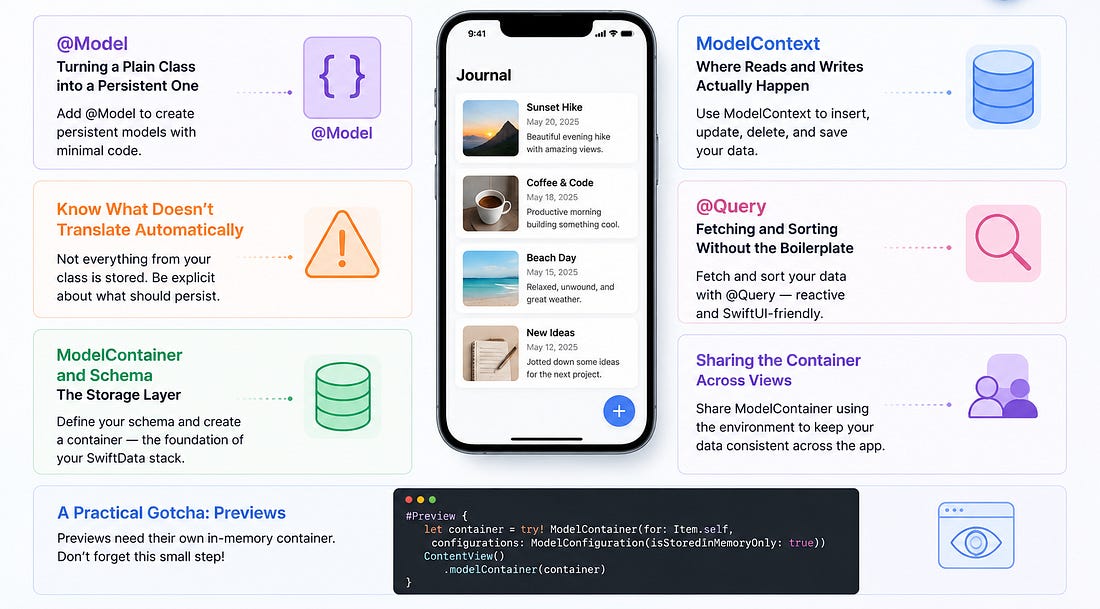
@Model: Turning a Plain Class into a Persistent OneSwiftData’s starting point is the @Model macro. Annotate any class with it and every stored property automatically becomes persistable — no protocol conformance, no boilerplate mapping code, no separate schema file to keep in sync by hand: This is what makes SwiftData feel lightweight compared to Core Data: a model is still just a Swift class you write and use normally throughout your app. SwiftData handles the storage plumbing behind the scenes. Know What Doesn’t Translate AutomaticallyNot every Swift or SwiftUI type is storable as-is. SwiftUI’s Image type is a common example — it can’t be persisted directly, so a property like this will throw a compile error the moment @Model is applied to the containing class. The fix is usually to store the underlying Data instead, and expose a computed property for the convenience of working with the rendered type: It’s a small pattern, but it’s one you’ll reach for often: store the raw, persistable form, and derive the convenient form on demand rather than trying to persist it directly. ModelContainer and Schema: The Storage LayerA ModelContainer is the object that actually owns your persistent store. You tell it which model types to manage via a Schema, and it takes care of setting up storage on disk: In practice, this setup lives in one place — often a small dedicated class — and gets attached to the app once, typically in the App struct’s body via the .modelContainer(_:) modifier. From there, every view in the hierarchy can reach the same underlying store. ModelContext: Where Reads and Writes Actually HappenIf the container is the store, the ModelContext is your workspace for interacting with it. Inserting a new object, deleting an existing one, and saving changes all go through the context: Note the pattern: mutate, then save. SwiftData won’t silently persist a change for you — save() is what actually commits it to disk. Forgetting that call is a common source of “my data isn’t sticking around” bugs. @Query: Fetching and Sorting Without the BoilerplateRather than manually fetching data and keeping a local copy in sync, SwiftData views can declare @Query and let the framework do the work: This single line replaces a @State array, a manual fetch call, and any code you’d otherwise write to keep that array current. The array is always sorted by date and always reflects what’s actually in the store — including changes made from a completely different view. This is also what solves the classic “two screens, two different copies of the data” problem: as long as both screens query the same model type, they’re always looking at the same underlying source of truth. Sharing the Container Across ViewsFor operations like insert and delete, views need access to the context itself, not just the queried results. A container class marked @Observable and @MainActor, injected via .environment(_:) at the app level, makes that available anywhere with: @MainActor is worth calling out specifically: it guarantees the container is only ever touched from the main queue, which avoids a category of data-race bugs that used to be easy to introduce with Core Data’s context handling. A Practical Gotcha: PreviewsSwiftUI’s #Preview support doesn’t always play nicely with SwiftData-backed views, particularly ones using @Query and @Environment together. It’s common enough that many SwiftData tutorials — and real projects — simply remove #Preview blocks from affected views and rely on running the app directly (in the simulator or on device) to check UI changes. Worth knowing going in, so it doesn’t look like a bug in your own code. Wrapping UpSwiftData’s real strength is how little ceremony it adds on top of code you’d write anyway: a plain class becomes persistent with one macro, a query replaces manual fetch-and-sync logic, and a shared context keeps every screen honest about what’s actually in storage. Once the container is set up and injected once at the app level, the rest of the framework mostly stays out of the way — which is exactly what you want from a persistence layer. This article is based on SwiftUI For Beginners published by Packt. 📚 Go DeeperIf you’re ready to start building beautiful, native Apple apps, SwiftUI for Beginners provides a practical, step-by-step introduction to SwiftUI, guiding you from your first views to building fully functional iOS applications with confidence.
SwiftUI For Beginners🤖 Add maps, photos, persistent data, and search to a real iOS application 🛠️ Build a complete CATLog app from scratch, applying each concept as you go 🔀 Test your app with TestFlight and publish it to the App Store 💭 Let’s TalkWhat’s one part of app development you wish felt as simple as SwiftData makes persistence? Reply and let us know. Advertise with usInterested in sponsoring this newsletter and reaching a highly engaged audience of tech professionals? Simply reply to this email and our team will get in touch with next steps. You're currently a free subscriber to Mobile & App DevPro Newsletter by Packt. For the full experience, upgrade your subscription.
|