👋 Hey,
"It's not who has the best algorithm that wins. It's who has the most data."
- Andrew Ng, Computer Scientist and Technology Entrepreneur.
In data-driven decision-making, it is not always sufficient to have the best algorithm to succeed. To solve complex data problems, it is crucial to collect and utilize relevant data effectively. This emphasizes the need for proactive data search and efficient data usage.
Today's edition will cover the significance of using appropriate methods and strategies while developing a Machine Learning model. We will also discuss the process of fine-tuning the model to enhance its accuracy, leading to more reliable and accurate conclusions.
Key Insights:
If you are interested in sharing ideas and suggestions to foster the growth of the professional data community, then this survey is for you. Consider it as your space to share your thoughts! Jump on in!
TELL US WHAT YOU THINK
Cheers,
Merlyn Shelley
Associate Editor in Chief, Packt
Netflix/metaflow: Build and manage real-life data science projects with ease.
wandb/wandb: A tool for visualizing and tracking your machine learning experiments.
bentoml/BentoML: Create ML services that are ready to deploy and scale.
determined-ai/determined: An open-source deep learning training platform that makes building models fast and easy.
skypilot-org/skypilot: A framework for running machine learning workloads at ease on any cloud through a unified interface.
ShannonAI/service-streamer: Helps in boosting your Web Services of Deep Learning Applications.
VertaAI/modeldb: Open-Source ML Model Versioning, Metadata, and Experiment Management.
logicalclocks/hopsworks: Data platform for ML with a Python-centric Feature Store and MLOps capabilities.
Getting started with Terraform and Datastream: Replicating Postgres data to BigQuery: Google Cloud's Datastream is a change data capture and replication service that simplifies the time-consuming process of producing analytics reports due to complex data storage. Along with Terraform, an Infrastructure as Code (IaC) tool, teams can now compile a list of data sources and create configuration files for replication, rather than setting up replication for each data source individually. This allows for data to appear in BigQuery within minutes of replication initiation.
Shorten the path to insights with Aiven for Apache Kafka and Google BigQuery: Aiven for Apache Kafka and Google BigQuery offer an excellent combination that allows users to source data from various tools and push it to BigQuery in streaming mode for manipulation and querying. Aiven provides a managed Kafka Connect cluster with over 30 connectors available for integrating Kafka with different technologies as both source and sink using a JSON configuration file.
Building streaming data pipelines on Google Cloud: Pipelines can be simple or complex, with some requiring minimal processing before storing data while others use advanced aggregation and multiple processing steps. There are three options for processing data: a BigQuery subscription for storing messages unchanged, Cloud Run for lightweight individual message processing, and Dataflow for advanced processing.
What do you call a machine learning model that's been overfitting for too long?
A muscle model!
In this section, we will serve two regression models and pass them to a service as runners. We might need to use more than one regression model to get more accurate predictions using an ensemble of multiple models. Then, we will get predictions from these two models and send the combined response to the user:
Step 1: First of all, let’s create the two models and save them using the BentoML API. First, let’s create a RandomForestRegression model using the following code snippet and save it using the BentoML API:
X, y = make_regression(n_features=4, n_informative=2,
random_state=0, shuffle=False)
rf = RandomForestRegressor(max_depth=3, random_state=0)
rf.fit(X, y)
rf_model = bentoml.sklearn.save_model(
name = "rf",
model = rf
)
Then, we create an AdaBoostRegressor model and save it with the BentoML API using the following code snippet:
boost = AdaBoostRegressor(random_state=0)
boost.fit(X, y)
boost_model = bentoml.sklearn.save_model(
name = "boost",
model = boost
)
Then, we run the program and follow the logs to ensure the models are created and converted using the BentoML API successfully. We see the following log in the terminal:
Model(tag="rf:fmb5uxcw76xuuktz")
Model(tag="boost:fnzdy2cw76xuuktz")
With that, the models are saved and assigned some tags to be loaded by the BentoML service.
Step 2: We create a service using two runners that can be used to ensemble the response from the two models. In the following code snippet, we create two runners for the two models we created before in step 1:
rf_runner = bentoml.sklearn.get("rf").to_runner()
boost_runner = bentoml.sklearn.get("boost").to_runner()
reg_service = bentoml.Service("regression_service", runners=[rf_runner, boost_runner])
@reg_service.api(
input=NumpyNdarray(),
output=NumpyNdarray(),
route="/infer"
)
def predict(input: np.ndarray) -> np.ndarray:
print("input is ", input)
rf_response = rf_runner.run(input)
print("RF response ", rf_response)
boost_response = boost_runner.run(input)
print("Boost response ", boost_response)
avg = (rf_response + boost_response) / 2
print("Average is ", avg)
return avg
We have saved the code along with the relevant imports in a file named regression_service.py.
Step 3: We can now start the service using the bentoml serve regression_service.py command. We can now look at the log where we can see that the server has started and is ready to receive API calls:
2022-10-28T15:36:35-0500 [INFO] [cli] Prometheus metrics for HTTP BentoServer from "regression_service.py" can be accessed at http://localhost:3000/metrics.
2022-10-28T15:36:35-0500 [INFO] [cli] Starting development HTTP BentoServer from "regression_service.py" running on http://0.0.0.0:3000 (Press CTRL+C to quit)
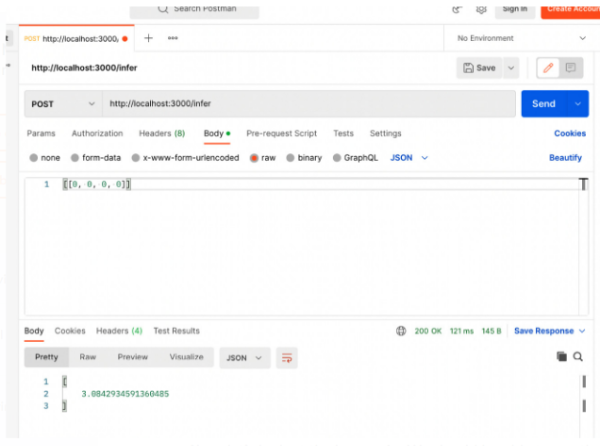
Step 4: Now, let’s go to Postman and send an inference request from there, and we will see an output like that in screenshot below.
Sending a request from Postman to the service serving two regression models, following an ensemble pattern. Now, let’s look at the log again. We should be able to see the response from the print statements in the log now, as shown here:
input is [[0 0 0 0]]
RF response [-0.68277116]
Boost response [6.85135808]
Average is [3.08429346]
2022-10-28T15:37:10-0500 [INFO] [dev_api_server:regression_service] 127.0.0.1:62121 (scheme=http,method=POST,path=/infer,type=application/json,length=14) (status=200,type=application/json,length=20) 53.526ms (trace=e0db708558d83c3bba0627f6e50b9165,span=75abbc1f48585e7d,sampled=0)
From the log, we can see that the service got the correct input that we sent. The response from the RandomForestRegression model is [-0.68277116], and the response from the AdaBoostRegression model is [6.85135808]. It took the average of these two models’ responses and returned [3.08429346] to the caller, which is what we saw from Postman.
In this section, we have used BentoML to serve two models using an ensemble pattern. We have tried to show an end-to-end process of serving the model using a standalone service. However, during deployment to an actual production server, you should use Bento instead of a standalone service.
This content is curated from the book, Machine Learning Model Serving Patterns and Best Practices (packtpub.com). To learn more, click on the button below.
SIT BACK, RELAX & START READING!
Datasets at your fingertips in Google Search: Google has launched a dedicated search engine for datasets called Dataset Search, which indexes over 45 million datasets from over 13,000 websites to make it easier for users to find and access datasets for various purposes such as scientific research, business analysis, and public policy. The aim is to make datasets as easily accessible as any other information on the web as data sharing continues to grow and evolve.
RLPrompt: Optimizing Discrete Text Prompts with Reinforcement Learning: RLPrompt is an approach for discrete prompt optimization using reinforcement learning, which improves NLP tasks on few-shot classification and unsupervised text style transfer. Strong optimized prompts are incoherent but transferable between LMs, opening many promising possibilities for prompting, such as learning prompts cheaply from smaller models and performing inference with larger models.
Four Analytics Best Practices We [Meta] Adopted — and Why You should Too: Meta has developed best practices for better decisions, a centralized repository of curated and reviewed best practices for various data problems, to ensure trustworthy and responsible data-driven decisions across the company. Meta believes that data is the foundation of providing a valuable and safe product experience to bring the world closer together and hopes that the data science community will find these best practices useful.
Responsible AI: The research collaboration behind new open-source tools offered by Microsoft: Microsoft offers a principled approach to responsible AI development which is referred to as targeted model improvement. It involves identifying solutions tailored to specific failures and implementing a model improvement life cycle. This approach aims to improve AI systems while mitigating failures and supports data & ML professionals in dealing with failures without posing new ones or affecting any other critical aspects of model performance.
Selecting the Right XGBoost Loss Function in SageMaker: Amazon SageMaker includes XGBoost as a built-in model for machine learning. Choosing the correct loss function for training XGBoost or other supervised learning models is crucial, particularly for regression tasks. Unlike other models, XGBoost trees can't be produced in parallel, they must be produced sequentially, with each subsequent tree predicting the error of the preceding tree. Picking the optimal loss function can result in a significant model improvement of over 30%.
MLOps with Optuna: Optuna is a powerful hyperparameter optimization framework that enables users to tune a range of models using various techniques. It helps improve model performance by understanding how hyperparameters affect models. Optuna creates a parameter grid for a study and optimizes over a series of trials, saving time and producing better models. This article aims to support MLOps for data science teams by creating utility functions that keep track of different models and setups used for creating and training each model.
Unlocking the Potential of JupyterLab: Discover the Powerful Text Editor You Never Knew You Had: JupyterLab is a tool that lets users create and share documents with live code, equations, visualizations, and text. It's great for scientific computing, data analysis, and machine learning workflows, and can run code in different environments. The goal of this article is to install Neovim and use JupyterLab as a Python IDE.
See you next time!