Hello, Parallels Desktop community!
I’m thrilled to announce the release of our latest Parallels Desktop update, 19.4.0. It offers improvements and fixes based on your valuable feedback.
Our Product and Engineering teams have been closely monitoring your needs and working hard to ensure Parallels Desktop continues to deliver a seamless and powerful experience.
See what’s new in this 19.4.0 update.
Enhanced compatibility with Windows apps on Apple silicon Macs
Compatibility with NinjaTrader, Mathematica, and other apps
We've received numerous requests from customers facing issues with apps that can't properly work with network folders.
For example, the NinjaTrader app would not start by default if you had enabled “Mirror Mac and Windows user folders” feature in the virtual machine's configuration.
We've reworked how Mac user folders (Documents, Desktop, Downloads, Music, Pictures, and Movies) are presented in Windows to address this issue.
Previously, Mac folders were available in Windows via a network share. For example, the NinjaTrader app would not start when installed from a network location in Windows. Other Windows apps may have errors when saving project files to a network location.
We’ve implemented a new approach using symbolic links in Parallels Desktop 19.4.0.
These symbolic links act like pointers that direct Windows applications to the actual location of your Mac's shared folders while still appearing to be located on the local Windows C drive.
This new approach allows Windows applications to work with Mac user folders the same way as they do with native Windows folders, without encountering compatibility issues.
If you're interested in running NinjaTrader, Mathematica, or other apps that didn’t work before, give them a try and share your feedback with us in our forums or in the comments of this post!
Compatibility with LabVIEW
Some of you have encountered serious issues installing LabVIEW in Windows 11 on Arm, particularly experiencing the crash (BSOD) after restarting Windows.
Our research indicated that this issue stemmed from Windows drivers compatibility issues between Intel x86_64 and Arm architectures. This compatibility problem prevented the OS from loading correctly and resulting in the dreaded BSOD.
Although we can’t modify the LabVIEW app directly, we have discovered that the underlying problem stems from the app loading its x86 drivers prior to the Windows drivers. This sequence disrupts the proper loading of Windows.
We previously released a KB article that provides a workaround, but customers have still reported challenges, resulting in roadblocks when working with LabVIEW in Windows 11 on Arm.
In response, we’ve implemented a fix to resolve this issue, ensuring that Windows will no longer boot into BSOD after a restart. For more details, refer to our updated KB article.
Running Microsoft SQL Server on Apple Silicon
Many customers, including students and developers, have requested the ability to run Microsoft SQL Server in Windows 11 on a Mac with Apple silicon, while the MS SQL Server is not fully compatible with Windows on Arm today.
The use cases are different. Examples include:
1. Developers who need to have an SQL database for application development, which is convenient because Visual Studio and Visual Studio Code work well in Windows 11 on Arm.
2. Students who want to work with SQL Server and connect to it from SQL Management Studio — which also works well in Windows 11.
3. People who want to install certain Windows software that requires an SQL database.
Given the current compatibility challenges, we've explored various solutions and are excited to introduce a new approach.
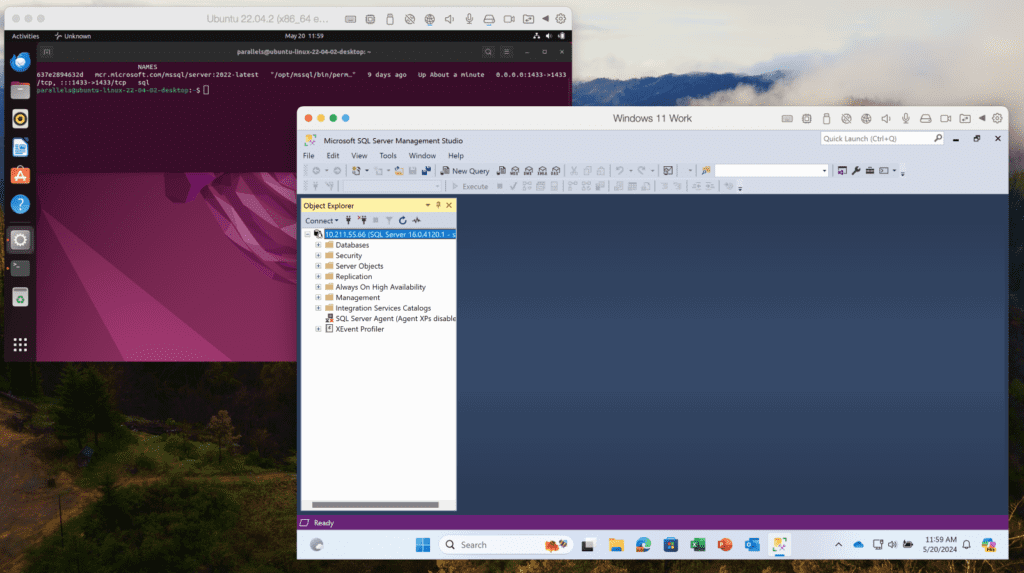
In the past, we used to offer our customers various solutions, but those didn't work for many users. Today, we believe that one of the most useful solutions would be to create an Ubuntu VM with x86_64 emulation and a preinstalled Docker engine.
This setup allows you to get Microsoft SQL Server running with a single command, making it easy to connect from Visual Studio, VS Code, or SQL Server Management Studio within your Windows VM. Detailed instructions can be found in our KB article.
This update will guide you through this process if you attempt to install SQL Server 2019/2022 in a Windows VM.
Improved integration with macOS
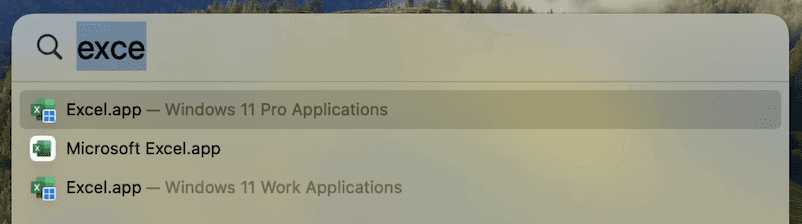
Many users enjoy using macOS Spotlight to search for applications. However, some have found it confusing when similar app names appear for their Mac and Windows/Linux apps.
To address this issue, we’ve added OS badge icons to the medium-sized icons of shared apps in Spotlight. This visual cue will help you quickly identify which OS the app belongs to without affecting your Dock icons.
Command line utility improvements (only Pro and Business Editions)
We love our developer and tester community, and we are continually working to improve your experience with Parallels Desktop.
New reclaim-disk action
You can now reclaim disk space in a shutdown VM using the prlctl Command Line Utility. To reclaim free disk space, simply execute:
prlctl reclaim-disk
Network conditioner control
The network conditioner is an excellent tool for users to test their applications under different network conditions and loads. We want to provide a way for this to be controlled in an automated way using prlctl.
There are two arguments supported for prlctl set now: --network conditioner and --network-conditioner-profile. For example, to run the network conditioner, execute the command below:
prlctl set
Extended output for prlctl list -i
We’ve extended the output information of the prlctl list -i command to include the IP address of running VMs, network throttling status, and whether the VM is a clone of another VM.
Here’s an example command:
prlctl list -i
For more details, check out the Parallels Desktop developer's guide.
Bug fixes
We’ve resolved an issue affecting our Business Edition customers. The download link in an invitation email from My Account would not activate the product with the assigned license. We've restored this functionality, ensuring a smoother onboarding process for your team members.
We've successfully addressed an issue in which the app windows for SolidWorks, Delphi, Grammarly, and other Windows applications running in Coherence view mode were displayed as blank windows.
We’re committed to continuously improving Parallels Desktop and appreciate your feedback and support. We hope you enjoy these enhancements, and as always, we look forward to hearing your thoughts! You can post in our forums or make a comment on this post with your feedback.
New to Parallels Desktop for Mac? Get your 14-day free trial of Parallels Desktop 19.4.0 now.